
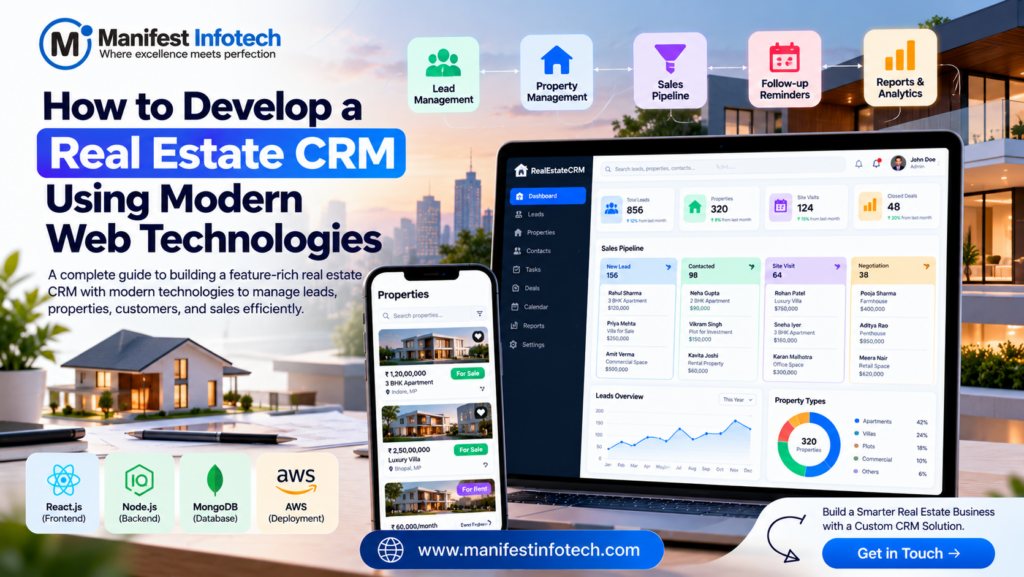
Real Estate CRM
The real estate industry depends on strong customer relationships, timely follow-ups, and efficient property management. However, managing leads through spreadsheets, emails, and multiple applications can make it difficult for real estate agents to stay organized and convert potential buyers into customers.
A Real Estate Customer Relationship Management (CRM) system helps businesses manage leads, track property inquiries, organize customer information, and improve communication throughout the sales process.
With modern web technologies, businesses can develop a custom real estate CRM tailored to their workflows, business goals, and growth plans.
In this guide, we explain how to develop a real estate CRM, which features to include, which technologies to consider, and how to approach the development process.
What Is a Real Estate CRM?
A real estate CRM is software designed to help property businesses manage customer relationships, sales opportunities, property inquiries, and follow-up activities.
It provides a centralized place to store lead information, track interactions, assign tasks, and monitor sales progress.
Real estate CRMs can be useful for:
- Real estate agencies
- Property developers
- Independent property agents
- Rental management companies
- Commercial real estate businesses
- Real estate sales teams
A custom CRM can also integrate with property listing websites, email services, messaging platforms, and existing business systems.
Essential Features of a Real Estate CRM
Before development begins, identify the features your team needs most.
1. Lead Management
Lead management is one of the most important CRM features.
The system should allow agents to capture leads from website forms, property inquiries, advertising campaigns, and manual entries.
Useful capabilities include:
- Lead profiles and contact details
- Lead source tracking
- Lead assignment to agents
- Lead status and priority
- Follow-up reminders
- Duplicate lead detection
A centralized lead database helps agents respond faster and avoid losing potential opportunities.
2. Customer and Contact Management
A CRM should maintain organized records of buyers, sellers, tenants, landlords, and investors.
Agents should be able to view contact information, property preferences, communication history, and previous inquiries from one place.
Access to customer records should be restricted according to each user’s role and responsibilities.
3. Property Management
Real estate teams often handle multiple properties at different stages of the sales or rental process.
A CRM can include property records containing:
- Property name and address
- Property type
- Sale or rental price
- Property features and amenities
- Availability status
- Images and documents
- Assigned agent
Connecting properties with leads helps agents identify suitable options for prospective customers.
4. Sales Pipeline Management
A visual sales pipeline helps agents track opportunities from initial inquiry to successful closure.
For example, a pipeline might include:
New Lead → Contacted → Qualified → Site Visit Scheduled → Negotiation → Closed
The stages should be configurable to match the company’s sales process.
Managers can use pipeline reports to understand how many opportunities are active and where deals are getting delayed.
5. Follow-Up Reminders and Notifications
Delayed follow-ups can result in missed opportunities.
A CRM should allow agents to schedule calls, meetings, property visits, and follow-up tasks.
Email or in-app notifications can remind team members about upcoming activities and overdue tasks.
6. Communication History
Recording customer interactions helps agents understand previous conversations and provide more consistent service.
Depending on business requirements, the CRM can track emails, calls, notes, appointments, and messaging interactions.
Integrations should follow applicable privacy rules and platform requirements.
7. Reports and Analytics
Reporting features help business owners and sales managers understand performance.
Useful reports may include:
- New leads by source
- Lead conversion rates
- Agent performance
- Property inquiry volume
- Scheduled site visits
- Sales pipeline value
- Closed deals
- Follow-up completion rates
These insights can help businesses improve marketing campaigns and sales processes.
8. Role-Based Access Control
A real estate CRM may support administrators, managers, agents, and other employees.
Each role should have appropriate permissions.
For example, agents may manage their assigned leads, while managers can view team performance. Administrators can configure users and system settings.
Permissions must be enforced on the backend rather than relying only on frontend visibility.
Best Modern Technologies for Real Estate CRM Development
Choosing the right technology stack depends on the CRM’s complexity, integration requirements, budget, and expected number of users.
One suitable option is the MERN stack.
| Component | Suggested Technology | Purpose |
|---|---|---|
| Frontend | React.js or Next.js | Build responsive CRM dashboards |
| Backend | Node.js and Express.js | Handle business logic and APIs |
| Database | PostgreSQL or MongoDB | Store leads, contacts, properties, and activities |
| Authentication | Secure session-based or token-based authentication | Manage user identity and access |
| Notifications | Email services and in-app notifications | Send reminders and updates |
| File Storage | Amazon S3 or compatible object storage | Store property images and documents |
| Hosting | AWS or another suitable cloud provider | Deploy and run the application |
| Analytics | Reporting tools and dashboard charts | Measure sales and operational performance |
Which database should you choose?
PostgreSQL is a strong choice when the CRM needs structured relationships between leads, contacts, properties, and transactions. MongoDB may suit applications with flexible document structures.
The best choice depends on the data model and business requirements rather than popularity alone.
Step-by-Step Guide to Developing a Real Estate CRM
Step 1: Define Business Requirements
Start by understanding how the real estate team currently manages leads, customers, properties, and follow-ups.
Identify the main problems and decide which workflows the CRM should improve.
Document user roles, reporting needs, integrations, and the expected number of users.
Step 2: Design the User Interface
Create wireframes for the dashboard, lead management page, contact profiles, property records, sales pipeline, and reporting screens.
Focus on a simple interface that allows agents to complete common tasks quickly.
A responsive design ensures the CRM remains usable on desktops, tablets, and smartphones.
Step 3: Design the Database
Plan how the main records will be stored and connected.
A basic CRM data model may include:
- Users: Employee accounts and roles
- Leads: Potential customers and lead sources
- Contacts: Buyers, sellers, landlords, and tenants
- Properties: Property details and availability
- Activities: Calls, meetings, notes, and follow-ups
- Opportunities: Sales pipeline records and deal stages
- Tasks: Assigned actions and due dates
Define appropriate relationships, validation rules, and indexes to maintain data quality and support efficient searches.
Step 4: Develop Backend APIs
Create APIs for lead creation, contact management, property records, task scheduling, pipeline updates, and reporting.
For example:
| Method | Endpoint | Purpose |
|---|---|---|
| GET | /api/leads | Retrieve leads the user is authorized to access |
| POST | /api/leads | Create a new lead |
| GET | /api/properties | Retrieve property records |
| POST | /api/activities | Record an interaction or activity |
| PATCH | /api/opportunities/:id | Update an authorized opportunity |
| GET | /api/reports/overview | Retrieve dashboard statistics |
Every endpoint should validate incoming data and enforce the correct permissions.
Step 5: Build the Frontend Dashboard
Use React.js or Next.js to create reusable components such as lead tables, search filters, property cards, activity timelines, pipeline boards, and reporting charts.
Connect these components to the backend APIs.
Provide clear feedback for loading states, successful updates, validation errors, and failed requests.
Step 6: Integrate Notifications and Communication Tools
Add email notifications, reminders, and in-app alerts based on your team’s needs.
For example, agents can receive reminders about upcoming site visits or leads that require follow-up.
If the CRM integrates with external email or messaging services, implement authentication, error handling, and appropriate access controls.
Step 7: Add Reporting and Analytics
Develop dashboards that display useful business metrics.
Start with straightforward reports such as new leads, follow-up completion, pipeline stages, and conversion rates.
Define how each metric is calculated so managers can interpret the results consistently.
Step 8: Test and Deploy the CRM
Before launching, test lead creation, search, permissions, reminders, reporting, and integrations.
Also evaluate performance, mobile usability, accessibility, and security.
Deploy the CRM to a suitable hosting environment and configure HTTPS, backups, monitoring, and error logging.
Security Best Practices for a Real Estate CRM
A real estate CRM may store personal contact details, communication records, property documents, and commercially sensitive information.
Protect this data by following security best practices:
- Use secure authentication and password hashing.
- Enforce role-based permissions on the backend.
- Validate all user input.
- Protect APIs against unauthorized access.
- Use HTTPS to protect data in transit.
- Store credentials and API keys securely.
- Restrict access to uploaded files.
- Maintain regular backups and test recovery procedures.
- Keep software dependencies updated.
- Log important security events without exposing sensitive information.
Collect only the information necessary for your business operations and follow applicable privacy and data protection requirements.
How Much Does It Cost to Develop a Real Estate CRM?
The cost depends on the required functionality, user interface, integrations, reporting complexity, and development timeline.
A basic CRM with lead management, contact records, property details, and follow-up reminders requires less work than a platform with automated marketing, advanced analytics, multiple integrations, and complex permission rules.
Major cost factors include:
- Planning and UI/UX design
- Frontend and backend development
- Database design
- Third-party integrations
- Notifications and reporting
- Testing and security
- Hosting and maintenance
A practical approach is to start with a Minimum Viable Product (MVP) containing the most important features, then add advanced functionality based on feedback from real users.
Benefits of a Custom Real Estate CRM
A custom CRM can provide several advantages:
Centralized information: Keep leads, contacts, properties, and activities organized in one system.
Improved follow-ups: Reminders and task management help agents respond on time.
Better visibility: Managers can monitor sales pipelines and team performance.
Customized workflows: Adapt pipeline stages and processes to your business.
Integration opportunities: Connect the CRM with property websites, email services, and other tools.
Scalability: Expand the system as your team and business requirements grow.
The benefits depend on how well the CRM is designed and adopted by the people who use it.
Why Choose Manifest Infotech?
Developing a real estate CRM requires an understanding of business workflows, secure data management, user experience, and modern web technologies.
Manifest Infotech can help businesses evaluate their software requirements and explore suitable approaches to custom web application development.
Whether you need a lead management system, a property sales dashboard, or a CRM tailored to your real estate operations, careful planning can help you build a solution that supports your business goals.
Conclusion
Developing a real estate CRM using modern web technologies involves planning the right features, choosing a suitable technology stack, designing a reliable data model, and building secure, user-friendly workflows.
Start with lead management, contact records, property tracking, follow-up reminders, and a clear sales pipeline. Then expand with integrations, automation, and advanced analytics as your needs evolve.
A well-designed CRM can help real estate businesses organize their operations, improve customer communication, and manage sales opportunities more effectively.
Planning to build a custom real estate CRM? Contact Manifest Infotech to discuss your software development requirements.
𝐅𝐨𝐥𝐥𝐨𝐰 𝐔𝐬:
𝐋𝐢𝐧𝐤𝐞𝐝𝐢𝐧: linkedin.com/company/manifestinfotech
𝐅𝐚𝐜𝐞𝐛𝐨𝐨𝐤: facebook.com/manifestinfotech/
𝐈𝐧𝐬𝐭𝐚𝐠𝐫𝐚𝐦: instagram.com/manifestinfotech/
𝐓𝐰𝐢𝐭𝐭𝐞𝐫: twitter.com/Manifest_info