
Introduction
Educational institutions manage a large amount of information every day, including student profiles, admissions, courses, attendance, examinations, fees, and academic records. Managing this information through spreadsheets or disconnected applications can create data duplication, errors, and administrative difficulties.
A well-designed Student Information System database provides a centralized solution for storing, organizing, retrieving, and managing educational information. It helps schools, colleges, universities, and coaching institutes maintain accurate records while improving administrative efficiency.
However, developing an effective database requires more than creating a few tables. It involves understanding institutional requirements, identifying entities, defining relationships, selecting appropriate data types, applying database normalization, and implementing security measures.
A well-planned student information system database design helps educational institutions organize student records, academic information, attendance, examinations, and fee management in a structured way. It also improves data accuracy and makes future system upgrades easier.
In this guide, Manifest Infotech explains how to design a Student Information System database, including its essential tables, database relationships, ER diagram concepts, SQL examples, normalization techniques, security practices, and scalability considerations.
What Is a Student Information System Database?
A Student Information System (SIS) database is a structured data storage system that manages student-related information and academic operations within an educational institution.
It acts as a central repository for information such as:
- Student personal details
- Admission and enrollment records
- Courses and subjects
- Departments and classes
- Teacher and staff information
- Student attendance
- Examination results and grades
- Fee payments and outstanding balances
- Timetables and academic schedules
- Parent and guardian information
For example, when a new student joins a college, the system creates a student profile, records admission details, assigns the student to a course, and maintains related academic information.
All these records are connected through database relationships, making information easier to manage and retrieve.
Why Is Database Design Important for a Student Information System?
Database design directly affects the performance, reliability, security, and maintainability of an educational application.
Here are the major benefits of proper database design.
1. Centralized Student Records
A properly structured database stores student information in one organized system instead of maintaining separate spreadsheets and registers.
Authorized users can access updated information without searching through multiple files.
2. Reduced Data Duplication
Database normalization helps prevent unnecessary duplication of information.
For example, student details can be stored once and referenced by attendance, examination, and fee records using a unique student ID.
3. Improved Data Accuracy
Primary keys, foreign keys, unique constraints, and validation rules help maintain consistent information.
These constraints reduce incorrect records and prevent invalid relationships.
4. Faster Information Retrieval
Well-designed tables and suitable database indexes help retrieve student profiles, attendance reports, examination results, and fee records efficiently.
5. Better Security
A structured database allows administrators to control access to sensitive student and academic information.
6. Easier Maintenance and Future Development
A modular database structure makes it easier to introduce new features such as library management, transport management, online admissions, and learning management integrations.
Step 1: Identify the Requirements of the Student Information System
Before creating database tables, understand how the educational institution operates.
Different institutions have different requirements.
A school may need class-wise attendance, parent communication, and school fee management. A university may require departments, semesters, courses, subjects, credit systems, and examination records.
Identify the following requirements:
- How will student registration work?
- How will admissions be managed?
- Will students belong to different departments?
- Can students enroll in multiple courses?
- How will attendance be recorded?
- How will examinations and grades be managed?
- How will fees and payments be tracked?
- Will parents have separate accounts?
- Will teachers manage multiple classes?
- Will the system support multiple academic years?
Documenting these requirements before development helps determine the correct database structure.
Step 2: Identify the Main Database Entities
An entity represents an important object or concept for which information needs to be stored.
For a typical Student Information System, the main entities include:
| Entity | Purpose |
|---|---|
| Students | Stores student personal information |
| Parents/Guardians | Stores parent and guardian details |
| Departments | Stores academic department information |
| Courses | Stores course details |
| Subjects | Stores subjects offered by institutions |
| Teachers | Stores teacher information |
| Enrollments | Connects students with courses |
| Attendance | Records student attendance |
| Examinations | Stores examination information |
| Results | Stores examination marks and grades |
| Fees | Stores fee details |
| Payments | Records fee transactions |
| Academic Years | Manages academic sessions |
Each entity generally becomes a database table.
For example, a Students table stores student information, while an Attendance table stores daily attendance records.
Separating these entities makes the database easier to maintain and expand.
Step 3: Best Practices for Student Information System Database Design
After identifying the entities, define the database tables and their columns.
Here is an example structure using PostgreSQL.
1. Students Table
The Students table stores the basic information of each student.
CREATE TABLE students (
    student_id BIGINT GENERATED ALWAYS AS IDENTITY PRIMARY KEY,
    first_name VARCHAR(100) NOT NULL,
    last_name VARCHAR(100),
    date_of_birth DATE,
    gender VARCHAR(30),
    email VARCHAR(150) UNIQUE,
    phone VARCHAR(20),
    address TEXT,
    admission_date DATE NOT NULL,
    status VARCHAR(30) DEFAULT 'active',
    created_at TIMESTAMP DEFAULT CURRENT_TIMESTAMP
);
Important fields:
- student_id: Unique identifier for each student.
- first_name: Student’s first name.
- last_name: Student’s last name.
- date_of_birth: Student’s date of birth.
- email: Student’s email address.
- phone: Contact number.
- admission_date: Date of admission.
- status: Current student status.
The student_id acts as the primary key.
2. Departments Table
The Departments table stores information about academic departments.
CREATE TABLE departments (
    department_id BIGINT GENERATED ALWAYS AS IDENTITY PRIMARY KEY,
    department_name VARCHAR(150) NOT NULL UNIQUE,
    department_code VARCHAR(30) UNIQUE,
    description TEXT
);
Examples include:
- Computer Science
- Mechanical Engineering
- Civil Engineering
- Electrical Engineering
- Commerce
3. Courses Table
The Courses table stores the academic courses offered by an institution.
CREATE TABLE courses (
    course_id BIGINT GENERATED ALWAYS AS IDENTITY PRIMARY KEY,
    department_id BIGINT REFERENCES departments(department_id),
    course_name VARCHAR(150) NOT NULL,
    course_code VARCHAR(30) UNIQUE,
    duration_years INT,
    status VARCHAR(30) DEFAULT 'active'
);
A department can offer multiple courses.
4. Teachers Table
The Teachers table stores faculty information.
CREATE TABLE teachers (
    teacher_id BIGINT GENERATED ALWAYS AS IDENTITY PRIMARY KEY,
    department_id BIGINT REFERENCES departments(department_id),
    first_name VARCHAR(100) NOT NULL,
    last_name VARCHAR(100),
    email VARCHAR(150) UNIQUE NOT NULL,
    phone VARCHAR(20),
    joining_date DATE,
    status VARCHAR(30) DEFAULT 'active'
);
This table connects teachers with their respective departments.
5. Enrollments Table
An enrollment record connects a student with a course and academic year.
CREATE TABLE enrollments (
    enrollment_id BIGINT GENERATED ALWAYS AS IDENTITY PRIMARY KEY,
    student_id BIGINT NOT NULL REFERENCES students(student_id),
    course_id BIGINT NOT NULL REFERENCES courses(course_id),
    academic_year VARCHAR(20) NOT NULL,
    enrollment_date DATE NOT NULL,
    status VARCHAR(30) DEFAULT 'active',
    UNIQUE (student_id, course_id, academic_year)
);
Separating enrollment information from student profiles allows institutions to maintain academic history when students progress through different years or courses.
6. Subjects Table
The Subjects table stores the subjects offered as part of different courses.
CREATE TABLE subjects (
    subject_id BIGINT GENERATED ALWAYS AS IDENTITY PRIMARY KEY,
    course_id BIGINT NOT NULL REFERENCES courses(course_id),
    subject_name VARCHAR(150) NOT NULL,
    subject_code VARCHAR(30) UNIQUE,
    credits INT,
    semester INT
);
A course can contain multiple subjects.
7. Attendance Table
The Attendance table records the attendance of individual students.
CREATE TABLE attendance (
    attendance_id BIGINT GENERATED ALWAYS AS IDENTITY PRIMARY KEY,
    student_id BIGINT NOT NULL REFERENCES students(student_id),
    subject_id BIGINT REFERENCES subjects(subject_id),
    attendance_date DATE NOT NULL,
    attendance_status VARCHAR(20) NOT NULL,
    created_at TIMESTAMP DEFAULT CURRENT_TIMESTAMP,
    UNIQUE (student_id, subject_id, attendance_date)
);
Attendance status can include:
- Present
- Absent
- Late
- Excused
The unique constraint helps prevent duplicate attendance entries for the same student, subject, and date.
8. Examinations Table
The Examinations table stores examination details.
CREATE TABLE examinations (
    exam_id BIGINT GENERATED ALWAYS AS IDENTITY PRIMARY KEY,
    subject_id BIGINT NOT NULL REFERENCES subjects(subject_id),
    exam_name VARCHAR(150) NOT NULL,
    exam_date DATE NOT NULL,
    total_marks NUMERIC(7,2) NOT NULL,
    passing_marks NUMERIC(7,2) NOT NULL
);
This table allows institutions to organize examinations by subject.
9. Results Table
The Results table stores student examination results.
CREATE TABLE results (
    result_id BIGINT GENERATED ALWAYS AS IDENTITY PRIMARY KEY,
    student_id BIGINT NOT NULL REFERENCES students(student_id),
    exam_id BIGINT NOT NULL REFERENCES examinations(exam_id),
    marks_obtained NUMERIC(7,2) NOT NULL,
    grade VARCHAR(10),
    result_status VARCHAR(20),
    UNIQUE (student_id, exam_id)
);
The application should validate that marks obtained do not exceed the examination’s total marks and are not negative.
10. Fees and Payments Tables
Fee information and payment transactions should be stored separately.
Fees table:
CREATE TABLE fees (
    fee_id BIGINT GENERATED ALWAYS AS IDENTITY PRIMARY KEY,
    student_id BIGINT NOT NULL REFERENCES students(student_id),
    fee_type VARCHAR(100) NOT NULL,
    amount NUMERIC(12,2) NOT NULL,
    due_date DATE,
    status VARCHAR(30) DEFAULT 'pending'
);
Payments table:
CREATE TABLE payments (
    payment_id BIGINT GENERATED ALWAYS AS IDENTITY PRIMARY KEY,
    fee_id BIGINT NOT NULL REFERENCES fees(fee_id),
    amount_paid NUMERIC(12,2) NOT NULL,
    payment_date TIMESTAMP DEFAULT CURRENT_TIMESTAMP,
    payment_method VARCHAR(50),
    transaction_reference VARCHAR(150) UNIQUE
);
Keeping fee obligations separate from payment transactions supports installments, partial payments, and payment history.
For real payment gateways, payment status should be confirmed through secure server-side verification.
Step 4: Define Database Relationships
Database relationships describe how different tables are connected.
Understanding these relationships is essential for designing an accurate Student Information System database.
One-to-One Relationship
A one-to-one relationship means one record in a table is associated with one record in another table.
Example:
A student may have one dedicated profile extension containing additional personal information.
One-to-Many Relationship
A one-to-many relationship means one record can be connected to multiple records in another table.
Examples:
- One department can have multiple courses.
- One course can contain multiple subjects.
- One student can have multiple attendance records.
- One examination can have results for multiple students.
Many-to-Many Relationship
A many-to-many relationship means multiple records in one table can be associated with multiple records in another table.
For example, students can enroll in multiple courses, and each course can contain multiple students.
An intermediate table such as Enrollments manages this relationship.
For course-subject assignments, a separate junction table may be useful when subjects can belong to multiple courses.
An effective student information system database design uses primary keys, foreign keys, and clearly defined relationships to connect students, courses, teachers, attendance records, and examination results.
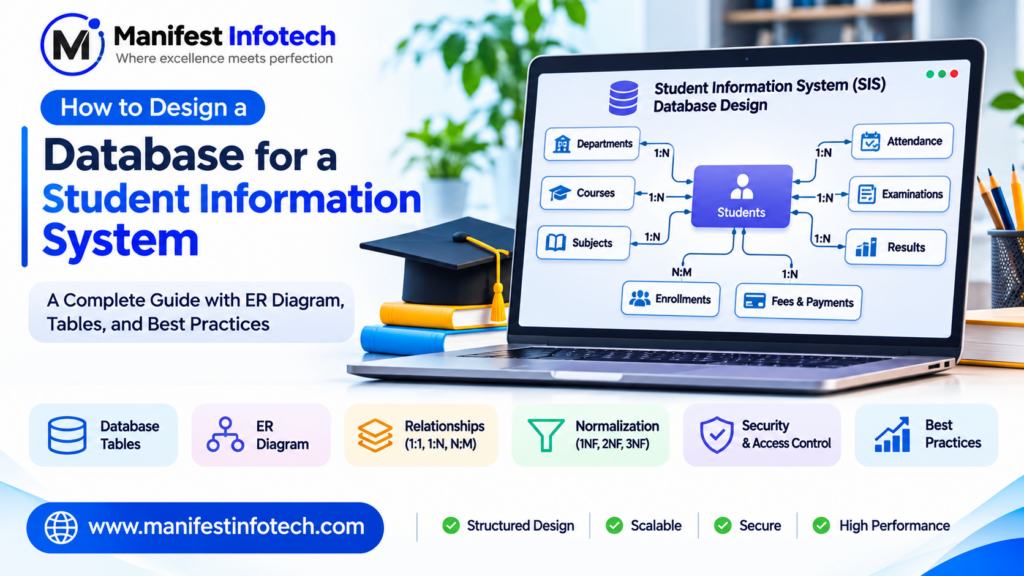
Step 5: Create an ER Diagram for the Student Information System
An Entity Relationship Diagram (ERD) visually represents database entities, their attributes, and their relationships.
It helps developers understand how the tables interact before implementing the database.
For example:
       DEPARTMENTS
            |
            | 1:N
            |
         COURSES
            |
            | 1:N
            |
         SUBJECTS
            |
            | 1:N
            |
      EXAMINATIONS
            |
            | 1:N
            |
         RESULTS
            |
            | N:1
            |
         STUDENTS
            |
            | 1:N
            |
        ATTENDANCE

STUDENTS 1 ---- N ENROLLMENTS N ---- 1 COURSES

STUDENTS 1 ---- N FEES 1 ---- N PAYMENTS
This is a simplified conceptual view. In an actual database, foreign keys and junction tables should be designed according to the institution’s academic workflows.
A complete ER diagram should also include teachers, guardians, academic years, class sections, timetables, and subject assignments when required.
Step 6: Apply Database Normalization
Database normalization is the process of organizing data to reduce unnecessary duplication and improve consistency.
It is particularly important in a Student Information System because the same student may have multiple attendance records, examinations, and payments.
First Normal Form (1NF)
A table is in First Normal Form when each column contains atomic values and there are no repeating groups.
Avoid storing multiple phone numbers or multiple course names in a single column.
Second Normal Form (2NF)
A table is in Second Normal Form when it satisfies 1NF and every non-key attribute depends on the entire candidate key.
This is especially important for tables that use composite primary keys.
Third Normal Form (3NF)
A table is in Third Normal Form when it satisfies 2NF and non-key attributes do not depend on other non-key attributes.
For example, department information should be stored in a Departments table rather than repeated in every student record.
Normalization makes the database easier to update and maintain.
Following normalization principles is an important part of student information system database design because it reduces duplicate records, improves data consistency, and simplifies database maintenance.
Step 7: Choose the Right Database Technology
Selecting an appropriate database depends on the application’s requirements, expected scale, data structure, and development team.
PostgreSQL
PostgreSQL is a strong choice for a Student Information System because it supports:
- Relational data structures
- Primary and foreign keys
- Transactions
- Complex SQL queries
- Indexing
- Constraints
- Reporting and analytics
It is particularly useful for systems that manage relationships between students, courses, attendance, examinations, and payments.
MySQL
MySQL is another popular relational database suitable for educational management applications.
It provides relational data management, indexing, transactions, and broad hosting support.
MongoDB
MongoDB is a document-oriented database that may be useful for flexible document structures and certain application requirements.
However, systems with many interconnected academic records should carefully evaluate relational data requirements before choosing a document database.
Recommendation: PostgreSQL is an excellent starting point for many Student Information System projects because of its relational capabilities and data integrity features.
Step 8: Add Indexes for Better Database Performance
As the number of students and academic records increases, database queries may become slower.
Indexes help the database locate records efficiently.
For example:
CREATE INDEX idx_students_email
ON students(email);

CREATE INDEX idx_attendance_student_date
ON attendance(student_id, attendance_date);

CREATE INDEX idx_enrollments_student
ON enrollments(student_id);

CREATE INDEX idx_results_student
ON results(student_id);
Indexes are particularly useful for frequently searched fields and columns used in joins.
However, too many indexes can increase storage requirements and slow down write operations. Create indexes based on actual query patterns and performance measurements.
Step 9: Implement Database Security
A Student Information System contains sensitive personal and academic information.
Security should be considered throughout database design and application development.
Important security practices include:
Role-based access control: Define separate permissions for administrators, teachers, students, parents, and finance staff.
Strong authentication: Protect application accounts using secure password hashing and appropriate session management.
Data encryption: Use HTTPS for data transmission and appropriate encryption at rest.
Least privilege: Give database users and application services only the permissions they need.
Input validation: Validate user inputs on the server to reduce the risk of SQL injection and invalid data.
Audit logs: Maintain records of important changes to student information, grades, attendance, and payments.
Database backups: Schedule regular backups and test restoration procedures.
Privacy protection: Collect only necessary information and apply suitable retention and access policies.
Never expose database credentials or sensitive student records through frontend code or public APIs.
Step 10: Test and Optimize the Database
Before deploying the Student Information System, test the database under realistic conditions.
Important testing activities include:
- Primary key and foreign key validation
- Duplicate record testing
- Data integrity testing
- SQL query testing
- Database transaction testing
- Attendance and result calculation testing
- Concurrent user testing
- Backup and recovery testing
- Access control testing
- Performance and load testing
For example, test whether the system correctly handles multiple teachers entering attendance at the same time.
Also verify that deleting or updating a student record does not unintentionally remove important academic history.
Use database migrations and version control to manage schema changes safely.
Recommended Technology Stack for Student Information System Development
A modern Student Information System can be developed using the following technologies.
| Component | Recommended Technology |
|---|---|
| Frontend | React.js, Next.js |
| Backend | Node.js, Express.js |
| Database | PostgreSQL |
| ORM | Prisma, Sequelize |
| Authentication | Secure sessions, JWT |
| API | REST API |
| File storage | AWS S3 |
| Hosting | AWS, Azure, Google Cloud |
| Testing | Jest, Playwright |
| Deployment | Docker, CI/CD |
| Monitoring | Sentry, CloudWatch |
The final technology stack should depend on application complexity, expected users, hosting requirements, and available development resources.
Common Database Design Mistakes to Avoid
Avoid these mistakes when designing a Student Information System database:
- Storing all information in one table: Separate students, courses, attendance, fees, and results into appropriate tables.
- Ignoring primary keys: Every major table should have a reliable unique identifier.
- Missing foreign key constraints: Define relationships to prevent invalid references.
- Using inconsistent data types: Select appropriate data types for dates, amounts, identifiers, and statuses.
- Skipping normalization: Reduce unnecessary duplication and update anomalies.
- Ignoring indexing: Optimize frequently used queries with suitable indexes.
- Mixing payments with fee structures: Keep fee obligations and individual transactions separate.
- Ignoring security: Restrict access to personal and academic information.
- Hardcoding academic rules: Support configurable grading systems, semesters, and academic years.
- Not planning for growth: Design clear relationships and test performance with realistic data volumes.
How Much Does It Cost to Develop a Student Information System?
The cost of developing a Student Information System depends on the number of modules, user roles, integrations, database complexity, security requirements, and application scale.
The following figures are illustrative planning estimates, not fixed quotations.
| Development Level | Estimated Cost (USD) | Typical Features |
|---|---|---|
| Basic | $2,000–$5,000 | Student records, courses, basic attendance |
| Intermediate | $5,000–$12,000 | Admissions, fees, examinations, dashboards, reports |
| Advanced | $12,000–$30,000+ | Parent portals, mobile apps, integrations, analytics, advanced security |
Additional costs may include:
- Cloud hosting
- Database management
- Domain and SSL
- Backup infrastructure
- Third-party integrations
- Maintenance and support
- Security audits
- Future feature development
For an accurate estimate, institutions should first define their requirements and expected number of users.
How Manifest Infotech Can Help
Developing a reliable Student Information System requires proper database planning, application architecture, secure backend development, and an easy-to-use interface.
Manifest Infotech helps businesses and educational organizations develop modern software solutions that support their operational and digital transformation goals.
Our software development capabilities can support:
- Custom Student Information System development
- School and college management software
- Database design and development
- PostgreSQL and MySQL integration
- React.js and Next.js development
- Node.js backend development
- API development and integration
- Cloud deployment and maintenance
Whether you are building a new educational management platform or upgrading an existing application, our team can help you plan a solution around your requirements.
Visit https://manifestinfotech.com/ to explore our services and discuss your software development project.
Conclusion
A well-designed Student Information System database is the foundation of an efficient educational management application.
By identifying the right entities, creating structured tables, defining relationships, applying normalization, and implementing security controls, developers can build a reliable system for managing student information.
PostgreSQL is a strong option for many relational educational applications, while proper indexing, testing, backups, and access control help maintain long-term performance and reliability.
The most important principle is to design the database around real institutional workflows rather than simply creating tables without a clear data model.
With the right planning and development approach, schools and colleges can build scalable Student Information Systems that simplify administration and improve academic information management.
Following these database design practices helps developers create a secure, scalable, and reliable student information system database design that supports the changing requirements of schools and colleges.
Frequently Asked Questions (FAQs)
1. What is a Student Information System database?
A Student Information System database stores and manages student profiles, admissions, courses, attendance, examinations, results, fees, and other academic records.
2. Which database is best for a Student Information System?
PostgreSQL and MySQL are suitable relational database options. PostgreSQL is particularly useful for applications that require complex relationships, transactions, and data integrity.
3. What are the main tables in a Student Information System?
Common tables include Students, Departments, Courses, Subjects, Teachers, Enrollments, Attendance, Examinations, Results, Fees, and Payments.
4. What is an ER diagram in database design?
An Entity Relationship Diagram (ERD) visually represents database entities, their attributes, and relationships. It helps developers plan the database before implementation.
5. Why is database normalization important?
Normalization reduces unnecessary data duplication and helps prevent insertion, update, and deletion anomalies.
6. What is the role of a primary key?
A primary key uniquely identifies each record in a database table and prevents duplicate identifiers.
7. What is a foreign key in a Student Information System?
A foreign key connects records between related tables. For example, student_id in the Attendance table references student_id in the Students table.
8. How can a Student Information System database be secured?
Use role-based access control, encryption, secure authentication, parameterized queries, audit logs, regular backups, and least-privilege database permissions.
9. Can a Student Information System support multiple academic years?
Yes. Store academic year information in a dedicated table and connect enrollments, attendance, examinations, and other academic records to the appropriate academic session.
10. Can a Student Information System integrate with an LMS?
Yes. A Student Information System can integrate with a Learning Management System through APIs to exchange authorized student, course, enrollment, and learning-progress information.
Official Database Documentation and Resources
When designing a Student Information System database, developers should refer to official database documentation to understand table creation, relationships, constraints, indexing, and database optimization.
The following resources provide useful technical guidance:
1. PostgreSQL Official Documentation
The official PostgreSQL documentation explains SQL commands, data types, table creation, primary keys, foreign keys, constraints, indexing, and database performance.
- PostgreSQL Documentation: https://www.postgresql.org/docs/
- SQL Language and Table Creation: https://www.postgresql.org/docs/current/sql.html
- Database Constraints and Relationships: https://www.postgresql.org/docs/current/ddl-constraints.html
- Database Indexing: https://www.postgresql.org/docs/current/sql-createindex.html
2. MySQL Official Documentation
The MySQL Reference Manual provides detailed information about database creation, table structures, primary keys, foreign key constraints, indexing, and query optimization.
- MySQL Reference Manual: https://dev.mysql.com/doc/
- CREATE TABLE Statement: https://dev.mysql.com/doc/refman/8.4/en/create-table.html
- Foreign Key Constraints: https://dev.mysql.com/doc/refman/8.4/en/create-table-foreign-keys.html
- CREATE INDEX Statement: https://dev.mysql.com/doc/refman/8.4/en/create-index.html
These official resources can help developers implement reliable database structures, maintain data integrity, and optimize the performance of a Student Information System.