
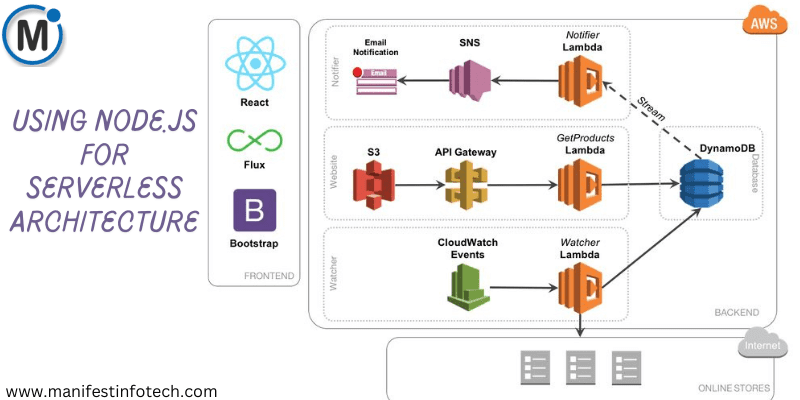
Serverless computing has revolutionized how developers build and deploy applications, eliminating the need for managing infrastructure. Platforms like AWS Lambda and Google Cloud Functions enable developers to run code in response to events without provisioning or managing servers. Node.js, with its lightweight and efficient runtime, is a popular choice for building serverless applications.
In this article, we will explore how to set up serverless functions using Node.js on AWS Lambda and Google Cloud Functions, and how they integrate with cloud services.
1. Setting Up Node.js with AWS Lambda
AWS Lambda allows running code in response to events from AWS services like API Gateway, S3, DynamoDB, and more.
Steps to Deploy a Node.js Function on AWS Lambda
Step 1: Install AWS CLI & Serverless Framework (Optional)
npm install -g serverless
aws configure # Set up AWS credentials
Step 2: Create a Node.js Lambda Function
Create a project folder and initialize it:
mkdir aws-lambda-node && cd aws-lambda-node
npm init -y
Create an index.js file and add the following code:
exports.handler = async (event) => {
return {
statusCode: 200,
body: JSON.stringify({ message: \”Hello from AWS Lambda!\” })
};
};
Step 3: Deploy to AWS Lambda
Zip the function and upload it via the AWS Console, or use the AWS CLI:
zip function.zip index.js
aws lambda create-function –function-name myLambdaFunction \\
–runtime nodejs18.x –role –handler index.handler \\
–zip-file fileb://function.zip
Step 4: Trigger AWS Lambda
You can invoke the function using:
aws lambda invoke –function-name myLambdaFunction response.json
AWS Lambda can be integrated with services like API Gateway, S3, and DynamoDB, allowing event-driven execution without maintaining a server.
2. Setting Up Node.js with Google Cloud Functions
Google Cloud Functions (GCF) offers similar serverless capabilities and integrates well with Google Cloud services like Firebase, Pub/Sub, and Cloud Storage.
Steps to Deploy a Node.js Function on Google Cloud Functions
Step 1: Install Google Cloud SDK & Set Project
curl https://sdk.cloud.google.com | bash
exec -l $SHELL
gcloud auth login
gcloud config set project [PROJECT_ID]
Step 2: Write the Cloud Function
Create an index.js file:
exports.helloWorld = (req, res) => {
res.status(200).send(\”Hello from Google Cloud Functions!\”);
};
Create a package.json:
{
\”name\”: \”gcf-node\”,
\”version\”: \”1.0.0\”,
\”dependencies\”: {}
}
Step 3: Deploy to Google Cloud Functions
Run the following command:
gcloud functions deploy helloWorld –runtime nodejs18 \\
–trigger-http –allow-unauthenticated
Step 4: Test the Function
gcloud functions call helloWorld
Google Cloud Functions can be integrated with Firestore, Pub/Sub, and Cloud Storage, making it ideal for event-driven applications.
3. Comparing AWS Lambda and Google Cloud Functions
Feature
AWS Lambda
Google Cloud Functions
Cold Start Time
Slightly higher
Lower due to background execution
Language Support
Node.js, Python, Java, etc.
Node.js, Python, Go, etc.
Pricing
Pay per execution
Pay per execution
Integration
AWS Services (S3, DynamoDB)
Google Cloud Services (Firestore, Pub/Sub)
Conclusion
Using Node.js with serverless architectures like AWS Lambda and Google Cloud Functions simplifies development, enhances scalability, and reduces operational costs. Each platform offers seamless integration with cloud services, making them ideal for modern applications.
If you are looking for any services related to Website Development, App Development, Digital Marketing and SEO, just email us at nchouksey@manifestinfotech.com or Skype id: live:76bad32bff24d30d
𝐅𝐨𝐥𝐥𝐨𝐰 𝐔𝐬:
𝐋𝐢𝐧𝐤𝐞𝐝𝐢𝐧: linkedin.com/company/manifestinfotech
𝐅𝐚𝐜𝐞𝐛𝐨𝐨𝐤: facebook.com/manifestinfotech/
𝐈𝐧𝐬𝐭𝐚𝐠𝐫𝐚𝐦: instagram.com/manifestinfotech/
𝐓𝐰𝐢𝐭𝐭𝐞𝐫: twitter.com/Manifest_info
#NodeJS #Serverless #CloudComputing #AWSLambda #GoogleCloudFunctions #WebDevelopment #TechBlog #DevOps #SoftwareEngineering