
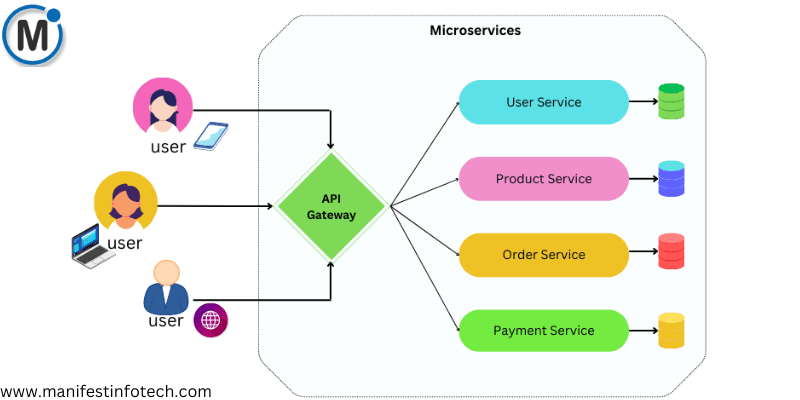
Microservices architecture has become a popular choice for building scalable, maintainable, and efficient applications. Node.js, with its non-blocking I/O and lightweight nature, is well-suited for microservices. In this blog, we will explore how to build a microservices architecture using Node.js, structure the services, handle communication, and integrate Docker for containerization.
What is Microservices Architecture?
Microservices architecture is an approach where an application is built as a collection of small, loosely coupled services that communicate with each other. Each microservice is responsible for a specific functionality and can be developed, deployed, and scaled independently.
Key Benefits of Microservices:
Scalability – Each service can be scaled independently based on demand.
Flexibility – Different services can be built using different technologies.
Resilience – Failure in one service does not affect the entire application.
Faster Development – Teams can work on different services simultaneously.
Structuring Microservices in Node.js
A microservices project in Node.js typically consists of multiple services, each with its own database and business logic. Below is a basic structure:
/project-root
│── services/
│ ├── user-service/
│ │ ├── src/
│ │ │ ├── controllers/
│ │ │ ├── routes/
│ │ │ ├── models/
│ │ │ ├── app.js
│ │ │ ├── server.js
│ │ ├── package.json
│ │ ├── Dockerfile
│ ├── order-service/
│ ├── product-service/
│── gateway/
│── docker-compose.yml
Each service has its own routes, controllers, and database models.
Handling Communication Between Services
Since microservices are independent, they need a way to communicate. Here are two common approaches:
1. REST API Communication
Each service exposes a REST API that other services can call using HTTP requests.
Example: User service calling Order service
const axios = require(\’axios\’);
async function getUserOrders(userId) {
try {
const response = await axios.get(`http://localhost:5001/orders/${userId}`);
return response.data;
} catch (error) {
console.error(\’Error fetching orders:\’, error);
}
}
2. Message Queue Communication (Recommended for scalability)
Using message brokers like RabbitMQ or Kafka allows services to communicate asynchronously.
Example: Publishing an event to RabbitMQ
const amqp = require(\’amqplib\’);
async function publishEvent(queue, message) {
const connection = await amqp.connect(\’amqp://localhost\’);
const channel = await connection.createChannel();
await channel.assertQueue(queue);
channel.sendToQueue(queue, Buffer.from(JSON.stringify(message)));
console.log(`Sent message to ${queue}`);
}
Using Docker for Microservices
Docker helps containerize microservices, making them easier to deploy and scale.
Example: Dockerfile for User Service
FROM node:14
WORKDIR /app
COPY package.json .
RUN npm install
COPY . .
CMD [\”node\”, \”server.js\”]
EXPOSE 5000
Running Multiple Services with Docker Compose
version: \’3.8\’
services:
user-service:
build: ./services/user-service
ports:
– \”5000:5000\”
order-service:
build: ./services/order-service
ports:
– \”5001:5001\”
Run the services:
docker-compose up –build
API Gateway for Managing Requests
An API Gateway acts as a single entry point for clients and routes requests to the appropriate microservice. Express.js and Nginx are commonly used for this purpose.
Example: Simple API Gateway in Express.js
const express = require(\’express\’);
const proxy = require(\’http-proxy-middleware\’);
const app = express();
app.use(\’/users\’, proxy.createProxyMiddleware({ target: \’http://localhost:5000\’, changeOrigin: true }));
app.use(\’/orders\’, proxy.createProxyMiddleware({ target: \’http://localhost:5001\’, changeOrigin: true }));
app.listen(4000, () => console.log(\’API Gateway running on port 4000\’));
Conclusion
Building a microservices architecture with Node.js allows for greater scalability and flexibility. By structuring services properly, handling communication efficiently, and leveraging Docker for containerization, you can create a robust and maintainable application.
If you are looking for any services related to Website Development, App Development, Digital Marketing and SEO, just email us at nchouksey@manifestinfotech.com or Skype id: live:76bad32bff24d30d
𝐅𝐨𝐥𝐥𝐨𝐰 𝐔𝐬:
𝐋𝐢𝐧𝐤𝐞𝐝𝐢𝐧: linkedin.com/company/manifestinfotech
𝐅𝐚𝐜𝐞𝐛𝐨𝐨𝐤: facebook.com/manifestinfotech/
𝐈𝐧𝐬𝐭𝐚𝐠𝐫𝐚𝐦: instagram.com/manifestinfotech/
𝐓𝐰𝐢𝐭𝐭𝐞𝐫: twitter.com/Manifest_info
#NodeJS #Microservices #Docker #Scalability #BackendDevelopment